YouChina

China digital arrival card · filling guide

China Arrival Card: how to fill it correctly

Use the free official NIA form before travel when practical. Have your passport data page, actual inbound route and port, first China address or contact, and companion documents ready. If online filling fails, official port channels remain available.

Use the current NIA prompt as the final instruction for the form on your screen.

Before you open the form

Who needs to fill it?

Foreign travellers entering China should check the current NIA exemption instruction, then follow the live form.

When to fill it

Use an official channel before travel when practical. No fixed time is stated.

What to prepare

Passport data page, inbound transport and port, first address or contact, and companion documents when relevant.

After you submit

Keep the QR, reference, or receipt if shown. If online filling fails, use the port fallback.

Step-by-step: follow the NIA form order

Five steps follow the English NIA form. Keep your documents and itinerary beside you.

Keep ready:
  • Passport data page
  • Inbound transport and entry port
  • First China address or contact
  • Companion documents when relevant

Step 1 is a live NIA capture checked 2026-08-14; Steps 2–5 are crops from the official November 2025 instructions. Avoid fee-charging copies; see the fraud warning.

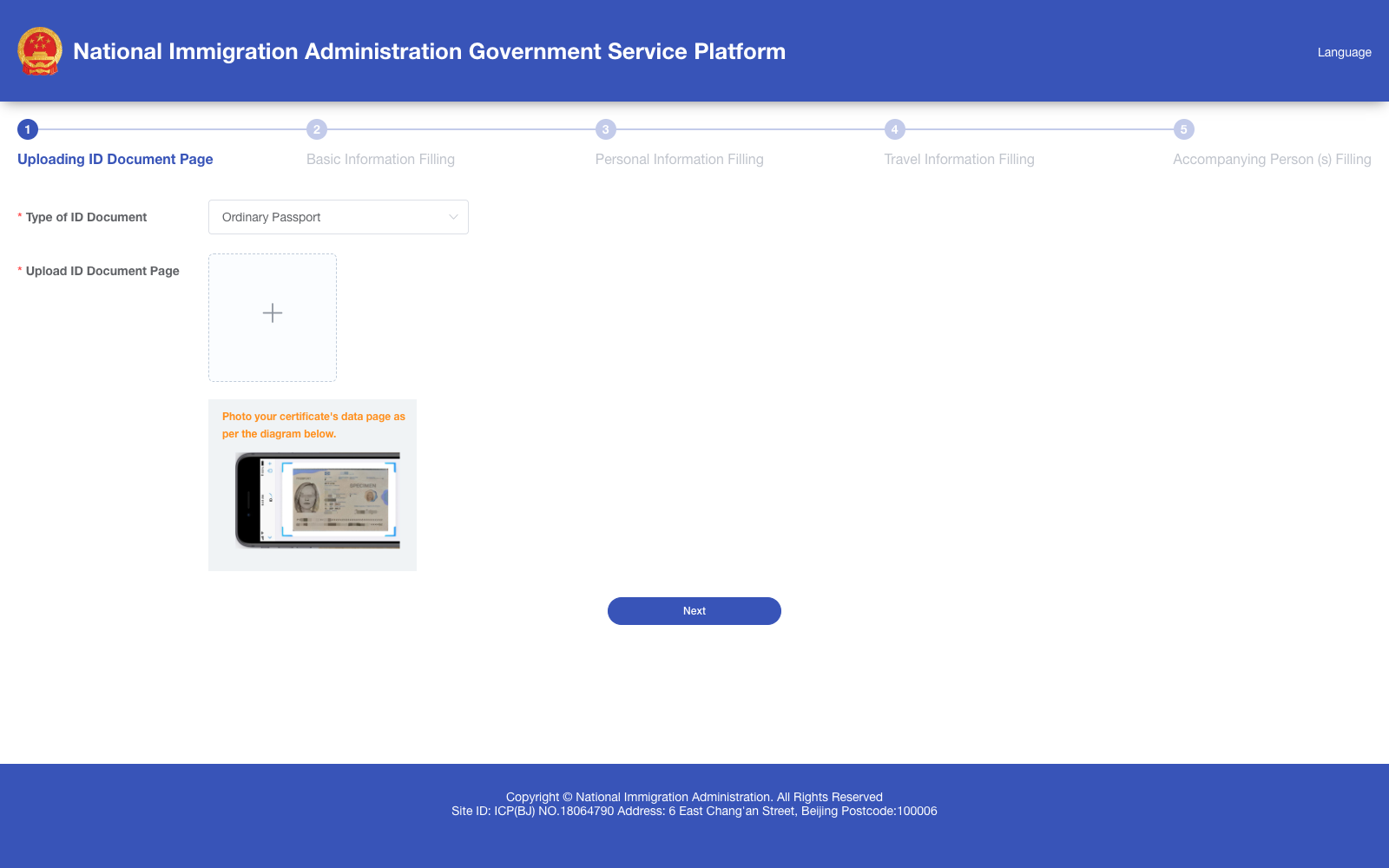
Blank English Step 1 of the official NIA PC Arrival Card form showing Type of ID Document and Upload ID Document Page
Open full-size image ↗Live capture from the official NIA English PC form, checked 2026-08-14. The form is blank; the live interface can change.

Start with your identity document

Official form step: Uploading ID Document Page

Start with the travel document you will use for this China entry.

What to do

Choose the document type shown by the portal, then upload a clear image of its data page. The current form shows Type of ID Document and Upload ID Document Page.

Use this information

Have the same document beside you while you fill the rest of the form. Use the data page, not a visa page, booking reference, or another identity document.

Watch out

Keep the full page readable and avoid blur, glare, or cropping. If the portal cannot read the image, follow its on-screen prompt instead of guessing a replacement value.

If your trip is different

If your document type is not listed, use the live portal instruction or confirm the document question with 12367 before continuing.
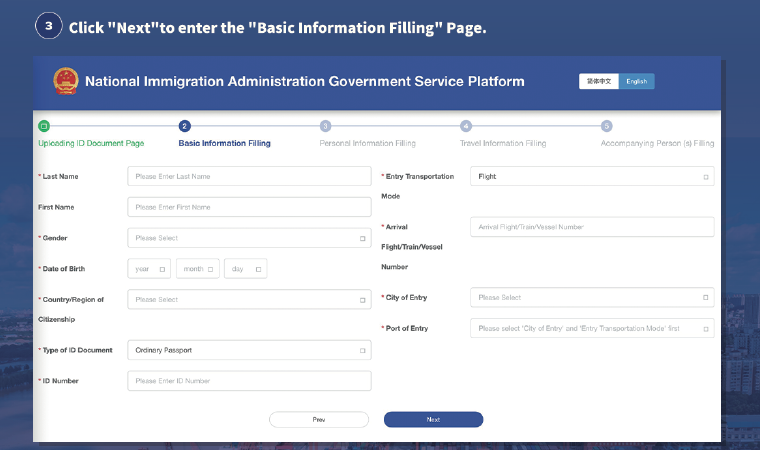
Official NIA November 2025 PC instruction crop showing the blank Basic Information Filling step
Open full-size image ↗Focused crop from the official NIA The Arrival Card Filling Instructions, November 2025 PC guide. The live interface can change.

Check your identity and first entry point

Official form step: Basic Information Filling

Check the identity information returned from the document image before moving on.

What to do

Review the name, gender, date of birth, citizenship, document type, ID number, and the arrival fields shown by the current form. Complete City of Entry and Port of Entry for the first China immigration point, then correct OCR results against your document before selecting Next.

Use this information

Copy the spelling and order from the document you uploaded. Use the actual inbound transport and arrival number when those fields are shown here. For a domestic connection, keep the first China immigration point separate from the later domestic city.

Watch out

Do not swap family and given names, use a nickname, or replace the first China entry point with a later domestic connection. For Hong Kong or West Kowloon HSR, a land border, or a night train, check the current City of Entry and Port of Entry list instead of choosing a nearby option by guesswork.

If your trip is different

For multiple given names, a domestic connection, or a crossing that does not appear in the current city and port list, keep the document and itinerary open, follow the portal prompt, and confirm the choice with 12367 if it still does not fit.

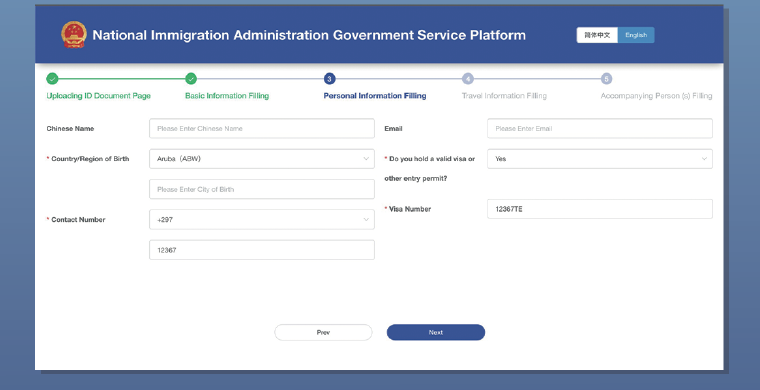
Official NIA November 2025 PC instruction crop showing the Personal Information Filling step
Open full-size image ↗Focused crop from the official NIA The Arrival Card Filling Instructions, November 2025 PC guide. The live interface can change.

Add your personal and entry details

Official form step: Personal Information Filling

Complete the personal and entry-permission fields the portal presents for your case.

What to do

Fill the requested Chinese name, country and city of birth, contact number, email, and any visa or other entry-permit fields that appear for you.

Use this information

Use reachable contact details and the entry document or permission you actually hold. If the form asks for a visa number, copy it from that document.

Watch out

Visa-free or transit travel does not mean you should invent a visa number. This page helps with the form fields; it does not decide Visa or Transit eligibility.

If your trip is different

If a conditional field appears or the policy option does not describe your case, pause and use the current NIA instruction or 12367 rather than selecting a convenient-sounding answer.

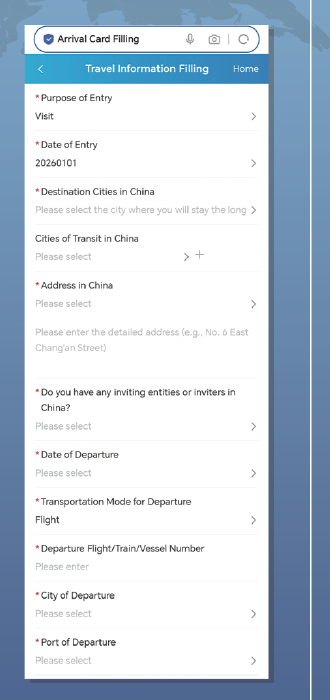
Official NIA November 2025 mobile instruction crop showing Travel Information Filling with destination, address, and departure itinerary fields
Open full-size image ↗Focused crop from the official NIA The Arrival Card Filling Instructions, November 2025 mobile guide. The live interface can change.

Add your itinerary and China stay details

Official form step: Travel Information Filling

Add the destination, stay, inviting contact, and departure details requested by the form.

What to do

Enter the purpose and date of entry, destination cities, cities of transit (transit cities), Address in China, and any inviting entity or contact fields shown by the form.

Use this information

Have your first China address, inviting entity or contact record, and departure itinerary ready. For a no-hotel or multi-city trip, use the current destination, transit, and Address in China prompts rather than combining them into one answer.

Watch out

Keep destination cities, transit cities, Address in China, inviting entity or contact, and departure details in their separate fields. If the form does not explain a no-hotel address or multi-city itinerary, do not invent a value.

If your trip is different

For a no-hotel stay, multi-city itinerary, missing address detail, or unclear departure field, use the current portal prompts and confirm with 12367 or staff at the port before submitting.

If you choose 24/240-hour Temporary Entry for Transit: the official instructions show a mandatory departure itinerary. Prepare the departure date, transportation mode, flight/train/vessel number, city, and port shown by the form. This explains the fields; it does not decide whether you qualify.

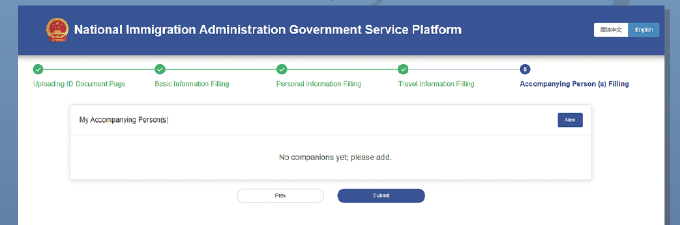
Official NIA November 2025 PC instruction crop showing the blank Accompanying Person(s) Filling screen with New and Submit controls
Open full-size image ↗Focused crop from the official NIA The Arrival Card Filling Instructions, November 2025 PC guide. The live interface can change.

Add companions and review before submitting

Official form step: Accompanying Person(s) Filling

Review the companion screen, add people only when the live form asks for them, and check everything before submission.

What to do

Open Accompanying Person(s) Filling and use New or Add when you need to create a companion record. Check each person’s details against that person’s own document.

Use this information

Keep the child or companion’s name, document, relationship, and contact details ready only for the fields the current form presents.

Watch out

Do not submit another person’s details without checking them. Before Submit, look for a declaration or signature prompt, read it carefully, and keep the Entry Declaration Receipt or QR after confirming.

If your trip is different

The live form decides how a child, guardian, or family member is added. If the companion screen does not fit your group, use the portal help or 12367 instead of assuming one family rule.

Submit, keep the receipt, and know the port fallback

Declaration and receipt

The official instructions show a declaration statement and signature before confirmation, followed by an Entry Declaration Receipt that can be downloaded locally or sent to email.

If online filling fails

Use the official QR route or smart devices at the port. Keep the portal receipt, QR, or reference accessible if the current form provides one.

If an option is missing

Do not choose a nearby port or city by guesswork. Ask port staff or contact China Immigration Service Hotline 12367.

Official fallback: NIA policy interpretation and NIA notice describe the official QR, smart-device, and paper channels at China ports.

FAQ

Short answers to common filling questions

The current NIA instructions list exemption categories and tell travellers to follow the live entry-information system. If your visa-free or transit case is not clear from the current instruction, use the official portal or confirm with 12367. This page does not decide eligibility.

Use an official NIA channel before travelling when practical. The official material used here does not set a fixed completion time. If you cannot complete it online in advance, NIA describes QR, smart-device, and paper options at the port.

Keep the QR, reference, or receipt available if the current form shows one. The official instructions show a declaration statement and signature step followed by an Entry Declaration Receipt that can be downloaded locally or sent to an email address.

Use the controls shown by the current NIA portal for your record. If the form does not explain how to correct or submit again, pause and confirm the case with 12367 rather than creating a second record by guesswork.

Use Step 2 for City of Entry and Port of Entry—the first China immigration point. Use Step 4 for destination cities, transit cities, Address in China, and departure details. For a domestic connection, Hong Kong HSR, a land border, a night train, no hotel, or multiple cities, follow the current city and port list and the current form prompts; do not guess, and confirm an unclear case with 12367.

Yes, if you could not complete it online in advance: NIA says the process can be completed at the port through the official QR route or smart devices, and paper Arrival Cards remain available.

Use the Accompanying Person(s) step and follow the live fields for the child or companion. If the screen does not explain your family situation, confirm it with 12367 rather than assuming every traveller uses the same record.

Policy context, after the task is solved

The current NIA notice and portal instructions describe who may be exempt and which official channels are available. Check the live instruction for your case. This page is about completing the form, not deciding Visa or Transit eligibility.

For eligibility and route decisions, use the relevant official guide. For form questions the live portal does not explain, use the NIA portal or 12367 before you travel.

Sources checked for this guide

  • The English NIA form sequence and labels were checked on 2026-08-14. The live form can change.
  • The official November 2025 NIA instructions show the PC steps, departure itinerary fields, accompanying-person screen, declaration, and Entry Declaration Receipt.
  • NIA policy and notice pages support the free official service and QR, smart-device, and paper options at the port.
  • When a route-specific choice is not explained by the current form, this guide tells you where to confirm it rather than inventing a field value.

Sources

Last checked:

Continue your China prep