YouChina

WeChat for travelers in China

微信

Tencent

How do foreigners use WeChat and WeChat Pay in China?

Cards and blocked features

Listed card brands

Beijing government guide (March 2026) lists Visa, Mastercard, American Express, Discover, JCB, Diners Club and UnionPay.

Listing these card brands does not guarantee every card or merchant will accept them.

Paraphrased source

Paraphrased source · Beijing Municipal Government (english.beijing.gov.cn)
Offline QR and help

International account help

For accounts registered with a phone number outside mainland China (not +86), read WeChat’s English help articles at help.wechat.com.

Applies to phone numbers outside mainland China (not +86).

Paraphrased source

Paraphrased source · WeChat

Updated 2026-10-15

Install, signup, and wallet

Screens may vary by app version.

Install the official app and follow the signup screen

Checked

Do Search “WeChat” in the App Store or Google Play and install only the green icon. Follow the signup screen: country code, number, then the SMS code.

See After the welcome screen you should see a country-code picker and an SMS field. If the app opens in Chinese: Me → Settings → General → Language.

If an assistance screen appears

Checked

Do Some new accounts show an assistance screen where {friendVerify|typed}.

See An on-screen QR code or assistance prompt appears with instructions for your region.

  • If the same screen stays up, ask support and keep the failed screen.

Open the wallet and verify your identity

Checked

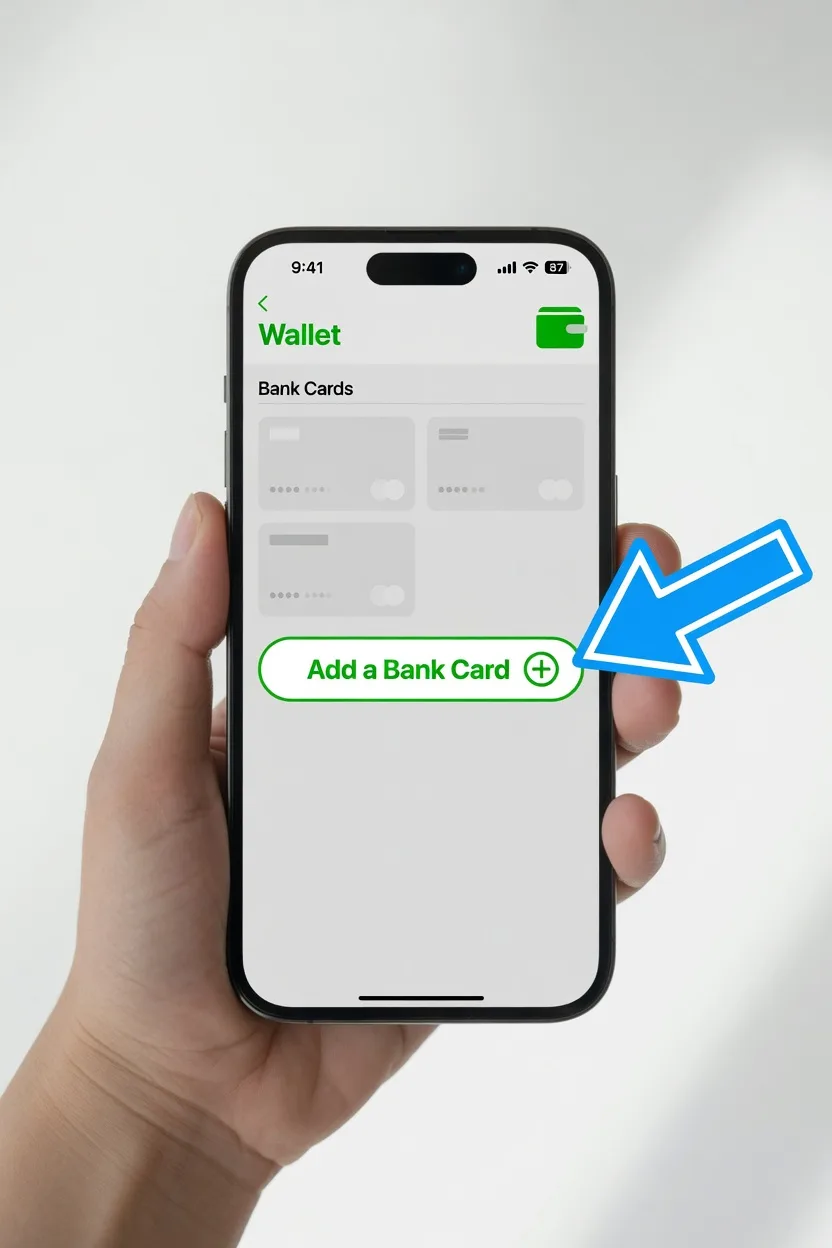
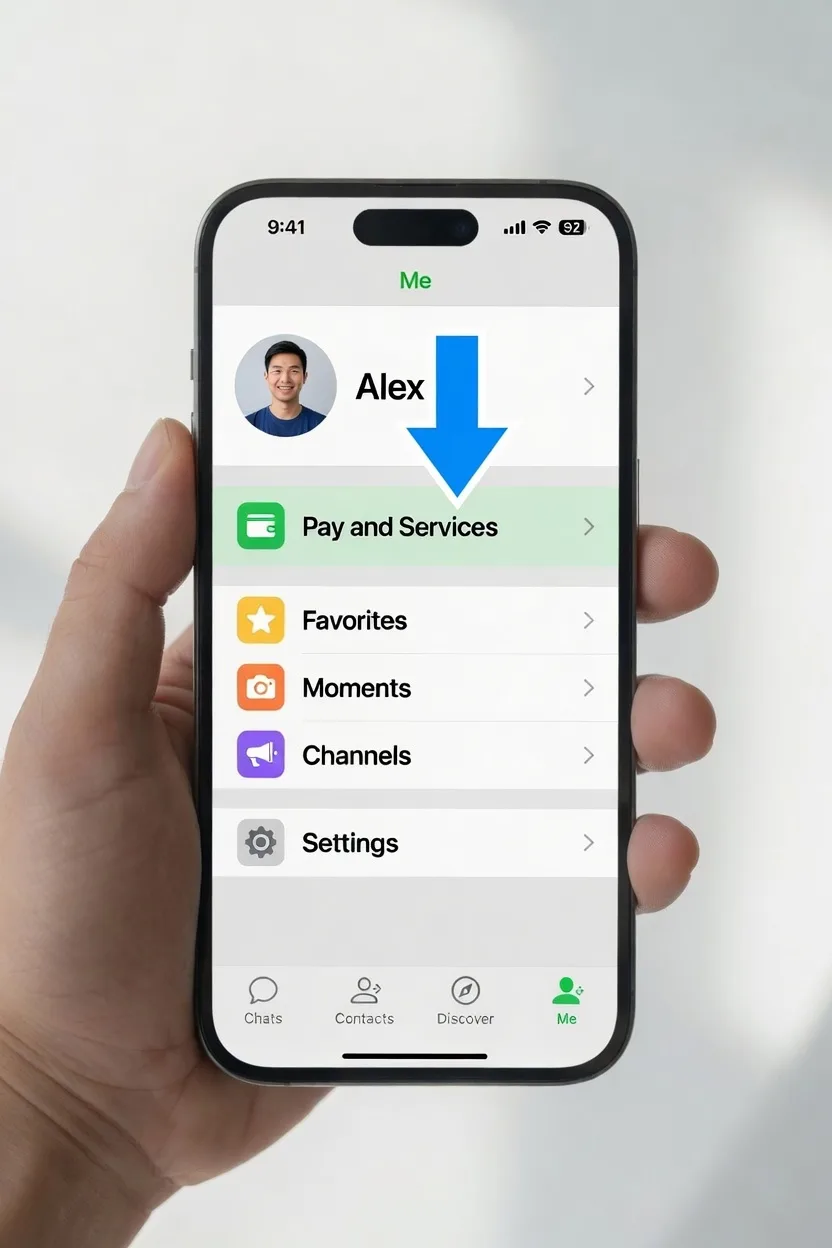
Do Follow the labels on the screen to open the wallet and add a card. One example in the photos is Me → Services / Pay and Services → Wallet, then Bank Cards → Add a Bank Card. Photograph the document the screen asks for.

See Use a clear photo of the document requested on the screen. Some flows start from a payment-restricted notice.

Me → Pay and Services. Then open Wallet
  • Retake the photo in bright light if the screen sends it back.

Add a foreign card

Checked

Do Follow the card form on the screen and enter the number, expiry, and security code. {foreignCard.state|typed}.

See The photo is Wallet → Add a Bank Card.

Wallet → Add a Bank Card. Bind is not guaranteed
  • If it refuses, try another card, then Alipay.

Check the fee and limits in the app, and keep a backup

Do Read the in-app fee line before you confirm a payment.

  • Check your issuer’s currency conversion and fees.
  • Keep a little yuan and Alipay as backup. Shops that will not take QR want cash.

Messages and shop payment

Pay at the counter

Check the amount and the recipient before you confirm.

If a message is hard to read

Ask for simpler wording, or use a translation tool.

Rides and meals

Prepare ride and food apps you can open on their own, and check sign-in and payment before you need them.

If a step fails

SMS never arrives
Turn VPN off. Turn airplane mode off. Resend on mobile data. If it still fails, try another number that can receive SMS.
Stuck on the assistance screen
Follow the prompts on the screen. If nobody is nearby, finish Alipay first.
Identity check will not move
Retake a clear photo of the document the screen asks for, in bright light. Pay with Alipay and cash while you wait.
The card will not add
Keep the error text. Ask the issuer whether overseas use is blocked. Try another card. If it still fails, use Alipay.
The shop declines the payment
Check wallet limit notices. Retry a smaller amount. Switch from Wi-Fi to mobile data. Use Alipay. If the shop will not take QR, pay yuan cash.
The app is in Chinese
Me → Settings (gear) → General → Language.

Questions

Can I use an international number for WeChat Pay?
Confirm SMS delivery on the screen before you fly.
Will my foreign card always bind?
The app and the issuer decide whether a card links.
What are the fees and limits?
Check the app before you pay.

Useful for your trip

Sources

Each source’s check date is listed below.