Pay identity
Passport, PRC Foreign Permanent Resident ID or Mainland travel permit or Mainland residence permit for Hong Kong, Macao, and Taiwan residents
These are WeChat Pay identity documents, separate from account sign-up.
Official source

微信
Tencent
WeChat is Tencent’s app for calls and chats, useful for contacting guides, hosts and people you meet in China. Set up WeChat Pay separately for shop payments. Foreign-card use depends on your card, account and risk checks.
Account sign-up and WeChat Pay identity verification are separate steps.
International cards can be used for everyday purchases in mainland China, but only if the card, the account, and risk checks allow it.
The WeChat Pay help center lists a 3% fee above ¥200, and a ¥6,500 per-payment limit for standard registration.
Passport, PRC Foreign Permanent Resident ID or Mainland travel permit or Mainland residence permit for Hong Kong, Macao, and Taiwan residents
These are WeChat Pay identity documents, separate from account sign-up.
Official source
A nearby friend can scan the on-screen QR with WeChat and conditions can differ by country or region
Account assistance follows the screen you see and differs by country and region.
Official source
The WeChat Pay help center lists a 3% fee on a payment above ¥200.
Under the help-center rule, no fee under ¥200; refunds return the fee pro rata.
Official source
For standard registration, WeChat Pay sets ¥6,500 per payment, ¥50,000 per month, and ¥65,000 per year.
Stated in RMB (¥).
Official source
A foreign card cannot use some WeChat Pay features, such as red packets and transfers.
This restriction does not apply to every WeChat user.
Official source
Beijing government guide (March 2026) lists Visa, Mastercard, American Express, Discover, JCB, Diners Club and UnionPay.
Listing these card brands does not guarantee every card or merchant will accept them.
Paraphrased source · Beijing Municipal Government (english.beijing.gov.cn)
Free to download on the App Store in the US and China, and listed on Google Play.
The App Store lines cover the US and China storefronts. The Google Play line is the US package, not every region's store.
App Store listing
Official source
Google Play listing
Official source
On an iPhone with the English UI, a mainland account, and a Chinese debit card, airplane mode still showed the payment QR while the receive-QR page failed to load.
Checked 2026-10-15. This observation shows screen display behavior only; it is not a completed checkout and does not show funds received or foreign-card eligibility.
Device observation · YouChina owner phone test
For accounts registered with a phone number outside mainland China (not +86), read WeChat’s English help articles at help.wechat.com.
Applies to phone numbers outside mainland China (not +86).
Paraphrased source · WeChat
Screens may vary by app version.
Do Search “WeChat” in the App Store or Google Play and install only the green icon. Follow the signup screen: country code, number, then the SMS code.
See After the welcome screen you should see a country-code picker and an SMS field. If the app opens in Chinese: Me → Settings → General → Language.
Do Some new accounts show an assistance screen where {friendVerify|typed}.
See An on-screen QR code or assistance prompt appears with instructions for your region.
Do Follow the labels on the screen to open the wallet and add a card. One example in the photos is Me → Services / Pay and Services → Wallet, then Bank Cards → Add a Bank Card. Photograph the document the screen asks for.
See Use a clear photo of the document requested on the screen. Some flows start from a payment-restricted notice.
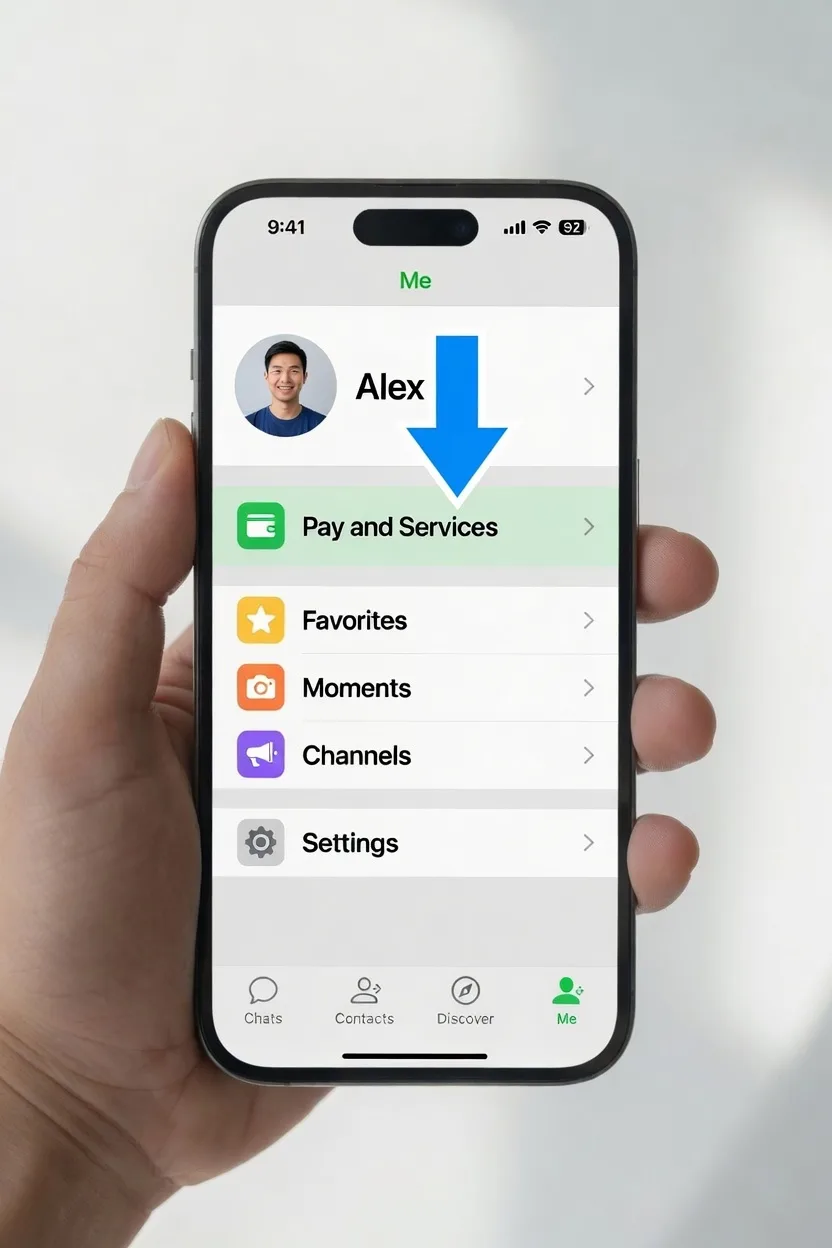
Official source
Do Follow the card form on the screen and enter the number, expiry, and security code. {foreignCard.state|typed}.
See The photo is Wallet → Add a Bank Card.
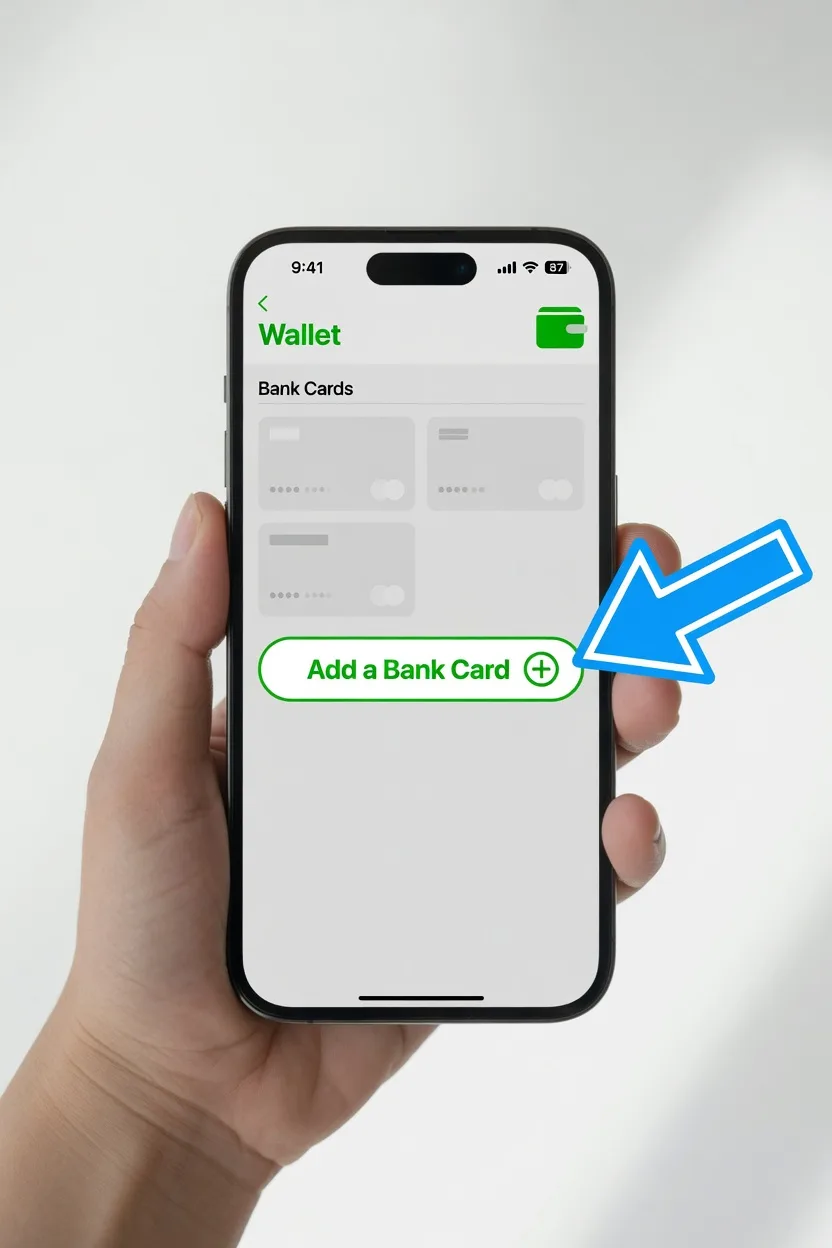
Official source
Do Read the in-app fee line before you confirm a payment.
Official source
Official source
Check the amount and the recipient before you confirm.
Prepare ride and food apps you can open on their own, and check sign-in and payment before you need them.
Official source
Official source
Official source
Official source
Official source
Official source
Official source